
Fraudulent websites get better looking every year. What gives them away is rarely the design: it is the address, the payment method and the pressure. These habits catch most of them.
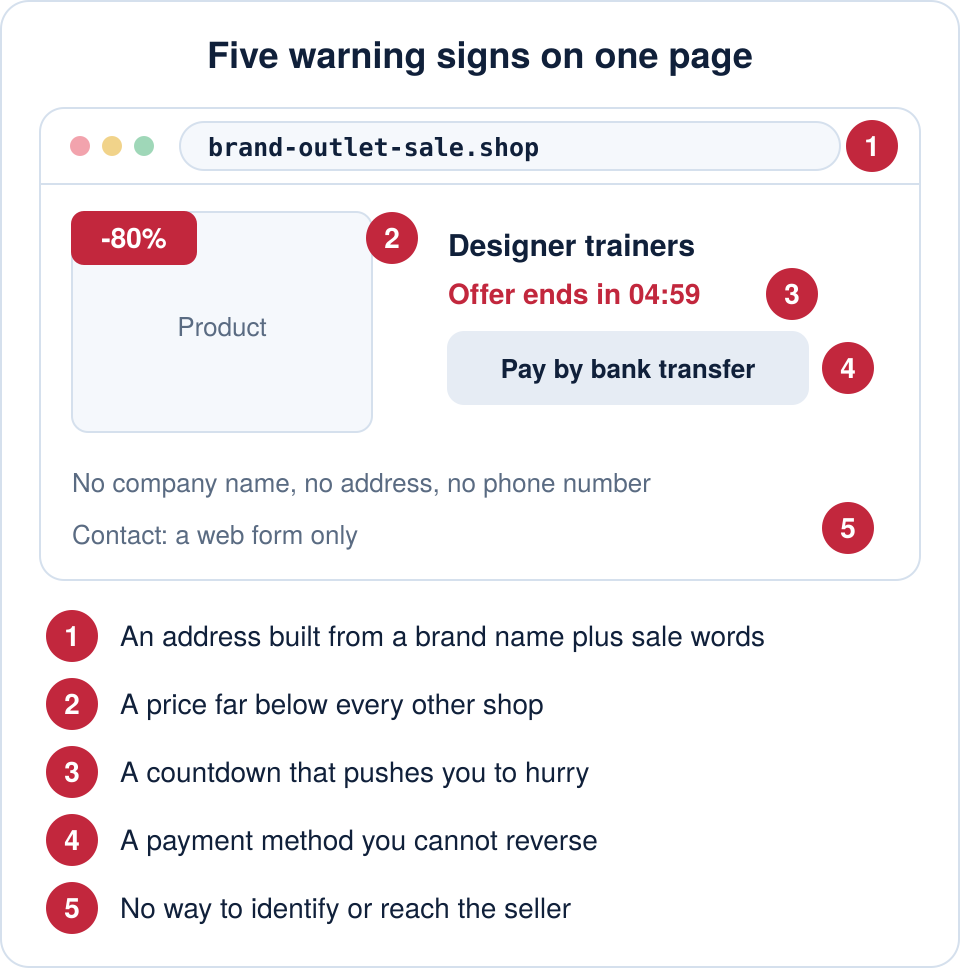
Read the address bar, character by character
The most effective attacks do not build a convincing site, they build a convincing address. One swapped letter, an added hyphen, .co instead of .com, or a subdomain arranged so that the real brand appears in the middle of a longer name. Read it slowly before you type anything into the page. How to read a link before you click shows where the real domain is in an address.
Do not follow links in messages
If an email or a text claims to come from your bank, your carrier, a parcel service or a marketplace, open the site yourself from a bookmark or by typing the address. Legitimate organisations lose nothing when you do that; scammers lose everything.
Check the domain before a first order
A WHOIS lookup takes ten seconds and answers one question no fake shop can dodge: how long has this address existed? A site selling at 70% off on a domain registered three weeks ago is not a bargain. For the other signs, see how to spot a fake online shop.
Pay in a way you can reverse
On a first order from a site you do not know, use a credit card, a virtual or single-use card number, or a payment service with buyer protection. Bank transfers, cryptocurrency and gift cards cannot be reversed, which is exactly why fraudulent shops insist on them. A checkout that suddenly switches payment method at the last step is a reason to close the tab.
Be suspicious of pressure
Countdown timers, "only 2 left in stock", a discount that ends in ten minutes: urgency is the oldest tool there is, because people who hurry do not check. A real offer survives the two minutes it takes to look the seller up.
Use strong, unique passwords
One password per site, generated rather than invented, stored in a password manager. A leak on a forum you forgot about should never open your email. You can generate one at createpass.net. Turn on two-step verification wherever it is offered, starting with your email account: whoever controls your inbox can reset every other password you have.
Never give card details or codes in a conversation
No support agent, delivery driver or marketplace seller has a legitimate reason to ask for your full card number, your online banking password or a code that was just sent to your phone. A code sent by your bank is a signature: reading it out to someone is signing whatever they are doing.
Do not rely on the padlock
The padlock means the connection is encrypted. It does not mean the site is honest: certificates are free and issued automatically, and almost every phishing page has one. See what the padlock really means.
Report what you find
Reporting a fraudulent site is what gets it taken down for the next person.
- United States: the Federal Trade Commission and the FBI Internet Crime Complaint Center.
- England, Wales and Northern Ireland: Report Fraud, the service that replaced Action Fraud in December 2025. In Scotland, call Police Scotland on 101.
- Canada: the Canadian Anti-Fraud Centre.
- Australia: Scamwatch.
- Elsewhere: your national cybercrime unit or consumer protection authority. For a seller in another country, econsumer.gov collects cross-border complaints.
It is also worth reporting the site to the registrar named in its WHOIS record. Registrars must publish an abuse contact and act on reports, and that is often the fastest route to a takedown.
If you have already paid, do not wait: here is what to do, in order.