
Phishing works because addresses are read from left to right and browsers decide from right to left. Once you know which part of an address counts, most fake links become obvious.
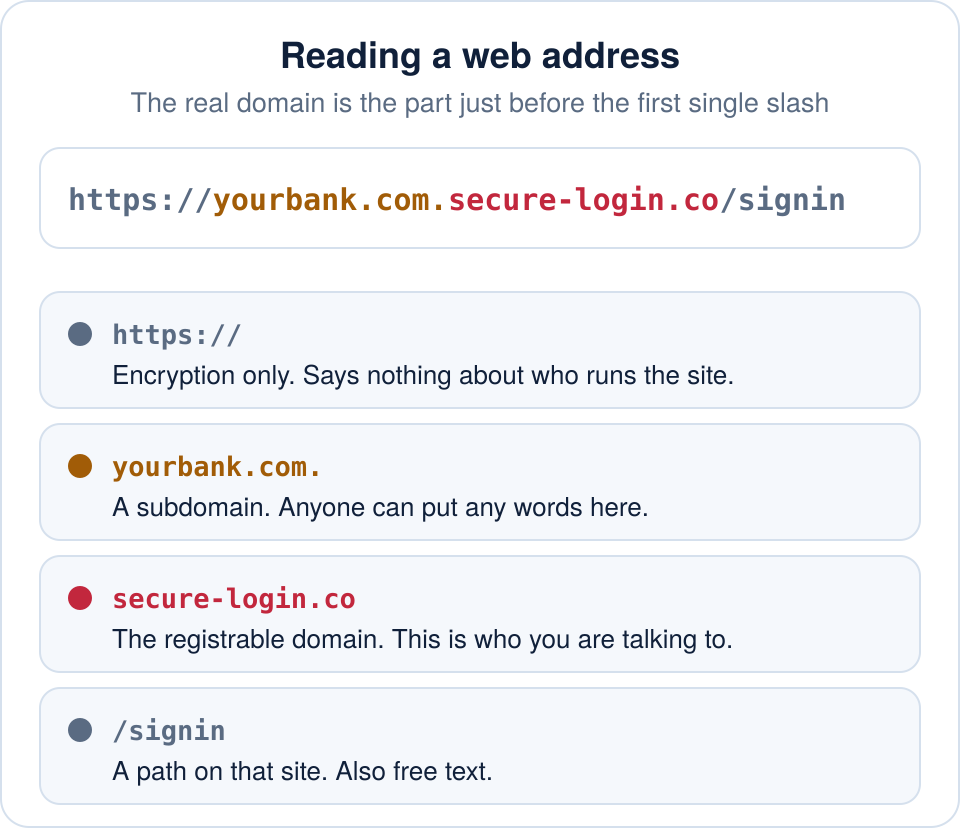
Find the real domain
Take the address and do this, in order.
- Ignore
https://at the start. - Find the first single slash after that. Ignore it and everything to its right.
- In what remains, read from the right: the extension, then the name just before it. Those two parts together are the domain. Everything further left is a subdomain chosen freely by the owner of that domain.
So in https://yourbank.com.secure-login.co/signin, the domain is secure-login.co. The words yourbank.com on the left are a subdomain, and the owner of secure-login.co can write anything there, including the name of your bank. In https://secure-login.yourbank.com/signin, the domain is yourbank.com and the address really is your bank's.
One refinement: some countries use two-part extensions, such as .co.uk or .com.au. There the domain is the name before those two parts: example.co.uk.
The common tricks
The brand as a subdomain
The example above. It is effective on phones, where the address bar shows only the beginning of a long address and the real domain is pushed out of view.
The brand in the path
https://secure-login.co/yourbank.com/signin. Everything after the first slash is the name of a page and can say anything.
The hyphenated brand
yourbank-support.com, yourbank-verify.com. A hyphen does not make a subdomain. These are entirely separate domains that anyone could register.
The typo
A doubled, missing or swapped letter: yourbnak.com, yourbankk.com. Also digits for letters, such as a zero for an o or a one for an l, and rn for m, which are nearly identical in many fonts.
The wrong extension
The right name with a different ending: .co for .com, .cm, .net, or one of the hundreds of newer extensions. Large companies register many variants defensively, but never all of them.
Letters from another alphabet
Several alphabets contain letters that look exactly like Latin ones. A Cyrillic "a" and a Latin "a" are different characters and identical on screen, so a name can be visually perfect and still be a different domain. Browsers defend against this by displaying suspicious mixed-script names in their encoded form, which begins with xn--. If you ever see xn-- in an address you expected to be a familiar brand, leave.
The at sign
In an address, anything between https:// and an @ is treated as a username, not as the site. https://yourbank.com@secure-login.co goes to secure-login.co. Modern browsers warn about this or strip it, but the trick still circulates in emails.
The shortened link
Link shorteners hide the destination completely. They are legitimate tools, widely used in text messages because of length limits, and for the same reason scammers love them. A bank or a tax office will not send you a login link through a shortener.
See where a link really goes
- On a computer, hover the pointer over the link without clicking. The destination appears at the bottom of the window. The visible text of a link and its destination are unrelated: a link can display
www.yourbank.comand lead anywhere. - On a phone, press and hold the link until a menu shows the full address. Then cancel.
- In an email, look at the sender's address as well, not just the display name. Apply the same right-to-left reading to the part after the
@.
Check the domain
When you have identified the real domain and do not recognise it, look it up. A phishing domain is almost always a few days old, because such domains are reported and suspended quickly. A creation date from this week on a link that claims to come from an organisation founded decades ago settles the question. See how to check the age of a domain.
The habit that makes all of this unnecessary
Do not log in through links. When a message asks you to act on an account, open the site yourself: from a bookmark, from the official app, or by typing the address you know. If the message was real, the notice will be waiting in your account. If it was not, you have just avoided it without needing to analyse anything.
A password manager helps for the same reason. It fills in your password only on the exact domain where it was saved. If it does not offer to fill on a page that looks like your bank's, the page is not your bank's.
And remember that the padlock proves nothing here: fake login pages have valid certificates too.